OrangePulse
Advanced DCA Trading Bot

Professional-grade automated trading for perpetual futures. 4 battle-tested strategies, smart DCA with emergency protection, and 3-stage trailing TP.

1-3%
Monthly Return
Multi
Exchange
v6
Pine Script
15+
Live Metrics
24/7
Automated
Scroll to explore

Key Features

Everything you need for professional crypto trading automation

๐ŸŽฏ

Entry Systems & Manual Control

4 battle-tested strategies plus on-demand manual entry. Start when YOU want or let the algorithms decide.

  • MeanReversion, TrendPullback, Breakout, MicroBreakout
  • Manual Mode: instant 1-bar entry override
  • Start at Price: trigger activation at specific level
  • Auto-disarm after first TP
๐Ÿ’ฐ

Smart DCA & Emergency Protection

Advanced averaging system with up to 10 Safety Orders plus 3 Emergency MSO for black swan events.

  • Volume Scale & Step Scale configuration
  • Dynamic ladder re-anchoring after fills
  • Emergency SO: time-triggered black swan protection
  • Budget-aware fills, never exceeds capital
๐Ÿ“Š

Advanced Exit Systems

Multi-layer profit protection: 3-stage trailing, price-level exits, and preemptive TP at Last SO.

  • 3-Stage Trailing: ARM โ†’ BUFFER โ†’ TRAIL
  • TP/SL at exact price levels (support/resistance)
  • TP at Last SO: close before final averaging
  • Manual SL in Profit lock gains mid-trade
๐Ÿ”Œ

Exchange Integration

Seamless automation with WunderTrading and 3Commas. JSON alerts with exact USD amounts for perfect execution.

  • WunderTrading JSON signals (BO/SO/Exit)
  • 3Commas DCA bot integration (add_funds, close)
  • One alert per bar (priority: EXIT > SO > BO)
  • Exact USD amounts in every signal
๐Ÿ’ต

Fee Transparency & True PnL

Full cost accounting with real-time tracking of Maker, Taker, and Funding fees for accurate profitability.

  • Real-time Maker/Taker fee tracking
  • Funding fee accumulation (per 8h)
  • True PnL calculation (post-fees)
  • Fee breakdown in Status Table
๐Ÿ”ง

Professional Bot Controls

Complete management dashboard with pause/stop, cooldown systems, and live Status Table showing 15 key metrics.

  • Pause/Stop/Resume functionality
  • Cooldown systems (BO/SO/Exit)
  • Live Status Table (AVG, PnL, SO progress, fees)
  • Visual status indicators (DISARMED/BUFFER/TRAILING)

Trading Strategies

4 intelligent entry modes for every market condition

MeanReversion Strategy

Enter when price touches Bollinger Bands extremes with RSI confirmation. Perfect for range-bound markets and oversold/overbought conditions.
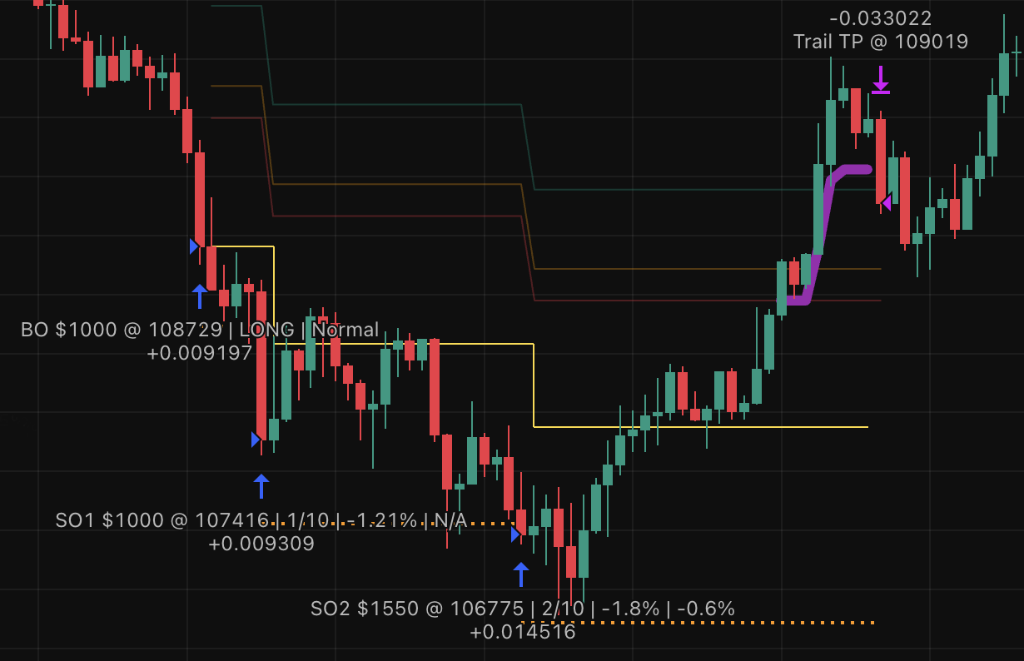
Indicator Bollinger Bands (20, 2.0)
Confirmation RSI < 30 (LONG) / > 70 (SHORT)
Best For Sideways markets, volatility spikes
Trend Filter Optional EMA200
MeanReversion Strategy Example

TrendPullback Strategy

Catch pullbacks in strong trends using dual moving averages and MACD confirmation. Ideal for trending markets with healthy corrections.
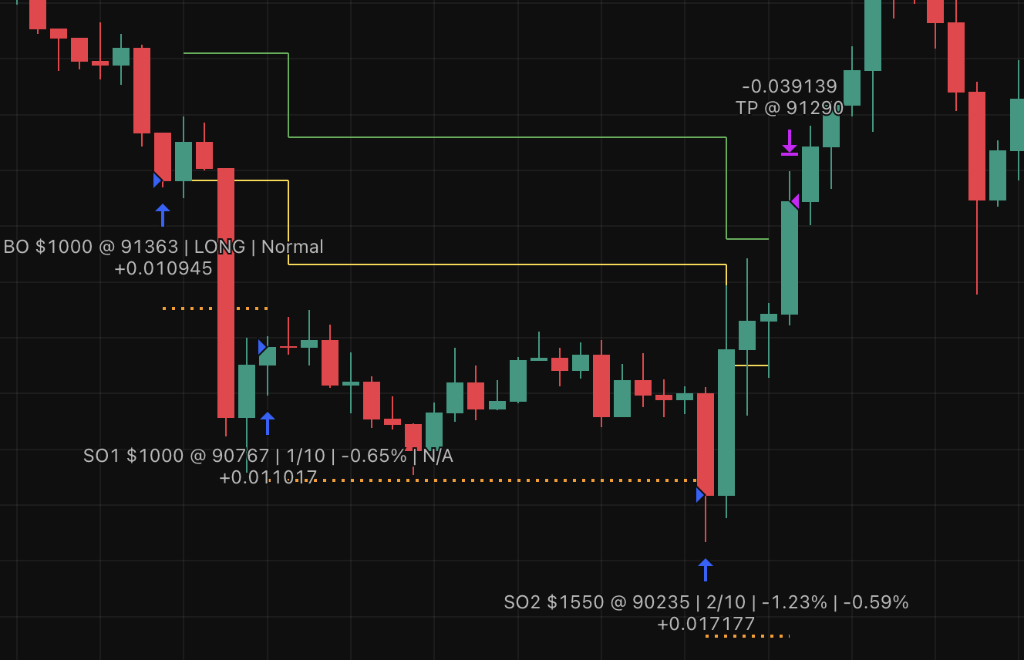
Trend MA EMA 200
Pullback MA EMA 20
Confirmation MACD crossover or MA reclaim
Best For Strong trends, bull/bear markets
TrendPullback Strategy Example

Breakout Strategy

Enter on range breakouts with volume confirmation and squeeze filter. Perfect for capturing explosive moves after consolidation.
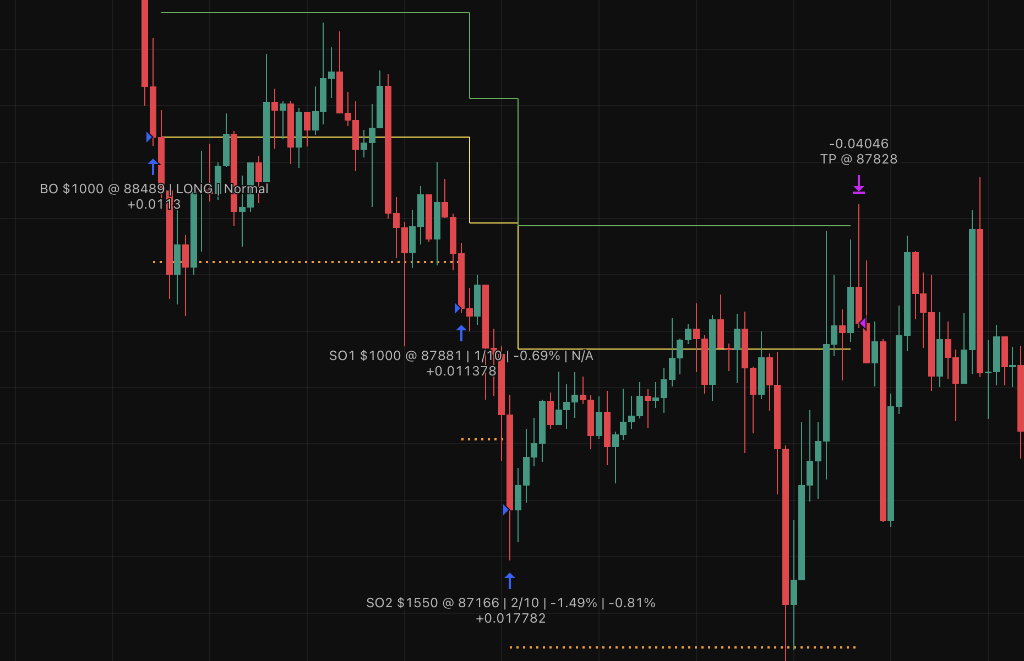
Range 20-bar high/low
Volume Filter 1.2x average volume
Squeeze BB width < 5% (low volatility)
Best For Consolidation breaks, news events
Breakout Strategy Example

MicroBreakout Strategy

Ultra-fast entries on Donchian Channel breakouts. Manual mode uses 1-bar lookback for instant execution on price levels.
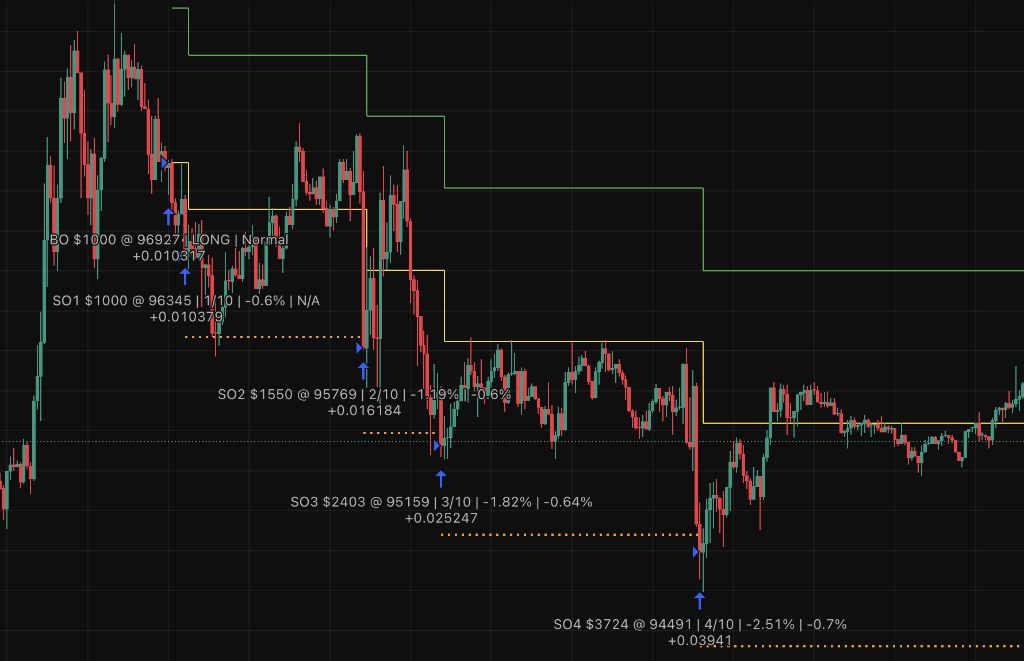
Lookback 3 bars (Normal) / 1 bar (Manual)
Epsilon 1 tick beyond level
Trigger Intrabar or close beyond
Best For Scalping, price level targeting
MicroBreakout Strategy Example

Smart DCA System

Intelligent position averaging that adapts to market conditions

BO $1,000 $100,000
โ†“ -0.5%
SO1 $1,000 $99,500
โ†“ -0.53%
SO2 $1,550 $99,025
โ†“ -0.56%
SO3 $2,403 $98,569
โ‹ฎ
SO10 $17,531 $96,180
โ†“ Time-based
MSO1-3 $10k-$30k Emergency

How DCA Works

๐Ÿ“

Base Order (BO)

Initial entry at strategy signal. Sets the reference price for all Safety Orders.

๐Ÿ“‰

Safety Orders (SO)

Up to 10 orders that trigger at increasing price deviations. Each SO is larger (Volume Scale 1.55x) and further away (Step Scale 1.05x).

๐Ÿšจ

Emergency SO (MSO)

3 additional large orders activated by time condition. Your safety net for black swan events.

๐Ÿ“Š

Average Price

Automatically recalculated after each fill. TP target moves to maintain your profit percentage.

Price Deviation Distance between SO trigger levels e.g. 0.5%
Volume Scale Size multiplier for each SO e.g. 1.55x
Step Scale Spacing multiplier between SOs e.g. 1.05x
Max SO Number of Safety Orders available e.g. 10 + 3 MSO

Multi-Layer Risk Management

Professional-grade protection at every stage

Entry Control

Cooldown after BO
Prevents premature SO1 trigger
Cooldown between SOs
Minimum bars between consecutive SOs
Cooldown after EXIT
Recovery period before new BO
Start at Price
Manual trigger at specific level

Position Management

Dynamic Averaging
Recalc AVG after each SO fill
Model B Ladder
Re-anchor remaining SOs after fill
Fee Accounting
Track Maker/Taker/Funding fees
Capital Management
Budget checks before SO execution

Exit Protection

Take Profit %
Standard TP from average price
3-Stage Trailing TP
ARM activates, BUFFER protects minimum profit, TRAIL follows peak
TP/SL at Price
Exit at exact price levels (support/resistance)
Fee Accounting
Real-time tracking: Maker/Taker/Funding
Stop Loss
% or price-based exits
TP at Last SO
Preemptive close to limit max drawdown
Emergency SO (MSO)
Time-based black swan protection (3 orders)

Seamless Integration

Connect with your favorite platforms and exchanges

TradingView

Built with Pine Script v6. Runs directly on TradingView charts with full backtesting support.

Primary Platform

Wunder
Trading

Send JSON alerts for automated order execution. Supports quote/base/percent amounts.

Alert System

3Commas

Native DCA bot integration with add_funds commands. Perfect for existing 3C users.

DCA Platform

Major Exchanges

Works with Binance, Bybit, OKX, and any exchange supported by WunderTrading or 3Commas.

Via Integrations
1

Configure Bot

Set strategy, DCA params, and TP/SL on TradingView

โ†’
2

Connect Platform

Link WunderTrading or 3Commas with your exchange

โ†’
3

Activate Alerts

Bot sends JSON signals on entry/exit conditions

โ†’
4

Trade 24/7

Fully automated execution on your exchange

Trading Tips

Best practices for successful automated trading

๐Ÿ“

Start with Paper Trading

Test your strategies on TradingView's paper trading mode before risking real capital. Backtest thoroughly to understand performance across different market conditions.

โš™๏ธ

Use Conservative Settings

Begin with lower leverage, fewer Safety Orders, and smaller position sizes. Gradually scale up as you gain confidence and understanding of the bot's behavior.

๐ŸŽฏ

Start with One Strategy

Master MeanReversion first (recommended for beginners). Once comfortable, experiment with TrendPullback, Breakout, or MicroBreakout based on market conditions.

๐Ÿ“Š

Monitor Status Table

Regularly check the live Status Table to track position health, unrealized PnL, fees, and SO fill levels. Early awareness prevents surprises.

๐Ÿ’ฐ

Understand Fee Impact

Trading costs add up quickly. Monitor Maker, Taker, and Funding fees in the Status Table. Fees reduce your effective profitโ€”factor them into your strategy.

๐Ÿ›ก๏ธ

Never Risk More Than You Can Afford

Automated trading is powerful but risky. Only trade with capital you can afford to lose. Set strict budget limits and stick to your risk management rules.

Choose Your Plan

Get unlimited access to OrangePulse with flexible pricing options

๐ŸŽ 14-Day Free Trial

Monthly

$ 99 /month

Try OrangePulse risk-free with full access to all features

  • โœ“ Full bot access
  • โœ“ All 4 trading strategies
  • โœ“ Complete User Manual
  • โœ“ TradingView script invite
  • โœ“ Priority email support
  • โœ“ Monthly updates
  • โœ“ Cancel anytime
Start Free Trial

No credit card charge for 14 days โ€ข Cancel anytime

๐Ÿ›ก๏ธ

30-Day Money-Back Guarantee

Not satisfied? Get a full refund within 30 days, no questions asked.

Frequently Asked Questions

The DCA (Dollar Cost Averaging) system starts with a Base Order (BO) when your chosen strategy triggers. If the price moves against you, Safety Orders (SO) automatically place additional buys/sells at calculated levels. Each SO is larger than the previous (Volume Scale 1.55x) and placed further away (Step Scale 1.05x). This lowers your average entry price, allowing you to exit at profit even if the initial entry wasn't perfect.

MeanReversion: Best for ranging markets and volatility spikes.
TrendPullback: Ideal for strong trends with healthy pullbacks.
Breakout: Perfect for consolidation breaks and explosive moves.
MicroBreakout: Great for scalping and precise price level entries.

Start by backtesting each on your target asset to see which performs best in current conditions.

OrangePulse is powerful but requires understanding of trading concepts like DCA, risk management, and technical indicators. We recommend:

  • Starting with paper trading on TradingView
  • Reading the comprehensive manual (PDF included)
  • Using conservative settings (lower leverage, fewer SOs)
  • Starting with one strategy (MeanReversion recommended)

The bot handles execution, but you must understand the strategy and risk.

OrangePulse runs on TradingView and sends alerts to either WunderTrading or 3Commas:

  1. Add the bot script to your TradingView chart
  2. Configure your preferred integration (WT or 3C) in the bot settings
  3. Set up webhook alerts with the provided JSON format
  4. Connect WunderTrading/3Commas to your exchange via API
  5. The bot will automatically execute trades via alerts

No direct API keys in TradingView - all execution happens through secure intermediary platforms.

MSO (Emergency SO) are 3 additional large orders that activate based on time conditions, not price. They're your safety net for extreme drawdowns:

  • Trigger only after all normal SOs are filled
  • Customizable USD amounts ($10k/$20k/$30k default)
  • Time-based activation (you set future timestamps)
  • Designed for black swan events or extended drawdowns

Most traders set these to dates far in the future and only reduce the timestamp if needed during a position.

Yes! We offer a 14-day free trial on the Monthly plan. You get full access to all 4 strategies, complete documentation, TradingView script invite, and priority support.

Your credit card will be required to start the trial, but you won't be charged for 14 days. If you decide OrangePulse isn't for you, simply cancel before the trial ends and you pay nothing. No questions asked.

The trial gives you plenty of time to test the bot, backtest strategies, and see real performance before committing to a subscription.

The 3-stage Trailing TP system maximizes profits in trending moves:

  1. ARM (Activation): Activates when price reaches your threshold (e.g., +1% profit)
  2. BUFFER: Protects downside - exits if price drops below ARM minus buffer (e.g., +0.8%)
  3. TRAILING: Activates after price rises further - trails behind the peak by your trail % (e.g., -0.5% from highest)

This ensures you lock in minimum profit (buffer zone) while capturing extended moves (trailing zone).

Yes! Simply select "LONG" or "SHORT" in the Direction setting. All strategies, DCA mechanics, and exit systems work symmetrically for both directions:

  • LONG: Buy low, sell high - SOs trigger below entry
  • SHORT: Sell high, buy low - SOs trigger above entry

All indicators (RSI, MACD, BB) automatically flip logic based on direction.

OrangePulse tracks all trading costs for accurate PnL:

  • Maker Fees: For limit orders (0.02% default)
  • Taker Fees: For market orders - BO/SO (0.05% default)
  • Funding Fees: Perpetuals funding rate per 8h (0.01% default)

All fees are cumulative and subtracted from unrealized PnL in real-time. The status table shows total fees: Buy / Funding / Sell (projected).

Ready to Get Started?

Request a TradingView invite and take your crypto trading to the next level

๐Ÿ“„ Quick Start Guide

Get up and running fast with our quick start guide. Step-by-step setup instructions.

Download PDF

๐Ÿ“ง Contact Support

Have questions? Need help with setup? Reach out to our support team.

support@orangepulse.net

โš ๏ธ Risk Disclaimer: Trading cryptocurrencies involves substantial risk of loss. OrangePulse is a tool to assist your trading strategy, not financial advice. Always use proper risk management, trade with capital you can afford to lose, and backtest thoroughly before live trading. Past performance does not guarantee future results.